
Walk into most manufacturing facilities and you'll see one of two scenarios: operators walking to a shared computer terminal every time they need to clock in or out of a job phase, or workers scribbling notes on paper travelers that get transcribed into a system hours or days later. Both approaches share the same fundamental flaw—they create friction between the work happening and the data being captured.
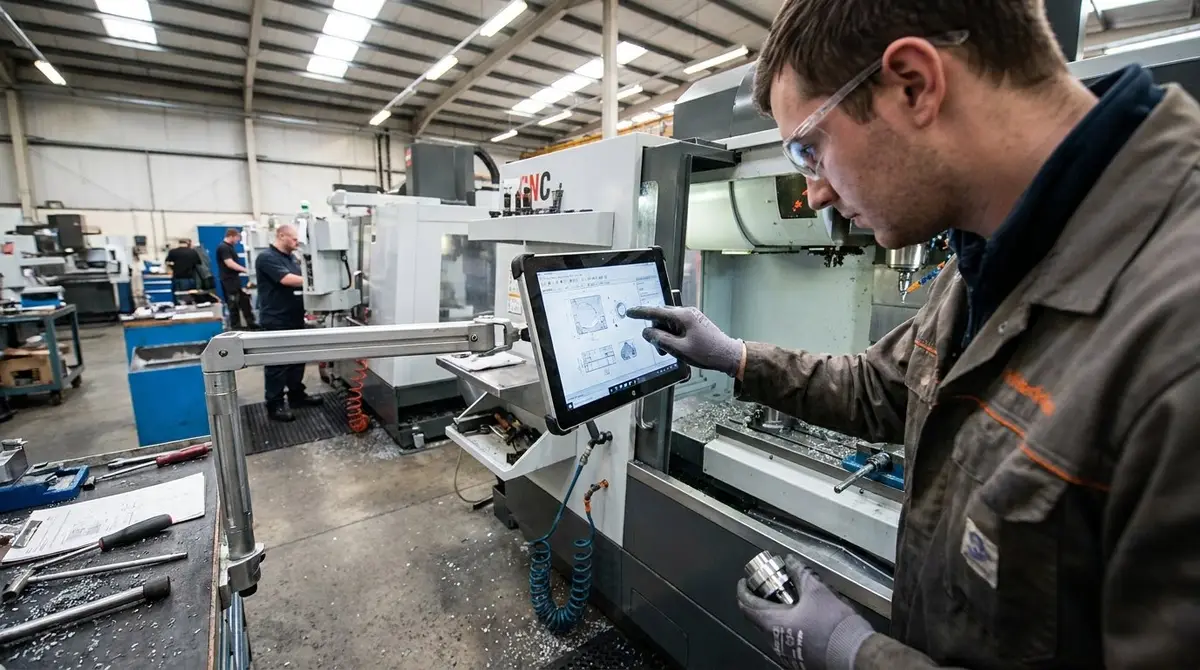
The alternative is deceptively simple: put a dedicated tablet at every production station where work actually occurs. But the implications of this shift run deeper than convenience. When operators have immediate, touch-based access to production tracking exactly where they work, the entire dynamic of shop floor data changes.
The Shared Terminal Bottleneck
Shared terminals made sense in the era of expensive desktop computers. One machine per department, operators take turns, everyone shares the resource. The cost logic was sound, but the workflow consequences were invisible on spreadsheets.
Every time an operator needs to update their status—starting a new phase, reporting completion, flagging a quality issue—they must physically leave their station, wait if someone else is using the terminal, navigate to their job, make the update, and walk back. That's three to five minutes of non-value-added time, repeated dozens of times per shift across multiple operators.
Multiply those minutes across a production floor and you're not just losing efficiency—you're training operators to batch their updates. Instead of logging each phase transition in real time, they memorize several changes and update everything at once during a break. The data becomes less granular, less accurate, and arrives too late to inform real-time decisions.
The Paper Traveler Illusion
Paper travelers feel immediate. The form moves with the work, operators check boxes and write notes right at the station, no computer required. But immediacy at the point of work doesn't equal immediacy in the system.
Someone—usually a supervisor or office administrator—must collect completed travelers, decipher handwriting, and transcribe data into whatever production tracking system the company uses. By the time a phase completion is recorded digitally, the part has often moved two stations downstream. Command center dashboards show yesterday's reality, not today's.
Worse, paper creates a one-way information flow. The traveler can't tell the operator that the previous station flagged a concern. It can't display updated specifications that engineering changed an hour ago. It can't alert the operator that this customer requires special packaging. All that context lives in separate systems, separate conversations, separate sticky notes.
What Changes With Station Tablets
When every production station has its own tablet running a phase-tracking interface, the relationship between operators and production data inverts. Instead of operators serving the data system by leaving their work to feed it information, the system serves operators by meeting them exactly where they are.
An operator walks up to their station. The tablet shows their active job. They tap to start the current phase—one touch, two seconds. The system timestamps the start, updates the command center dashboard in real time, and displays any notes or alerts from previous phases. When the phase completes, another tap logs it. If they need to flag an issue, the tablet is right there—no walking, no waiting, no forgetting.
This immediacy compounds in ways that aren't obvious until you see it running. Real-time phase data means production managers can spot bottlenecks while they're forming, not after they've caused delays. Operators can see their own productivity metrics and pace themselves accordingly. Quality issues get flagged in context, with timestamps that reveal patterns across shifts or stations.
The Touch Interface Advantage
The choice of tablets over traditional desktop terminals isn't just about portability—it's about interaction design for the shop floor environment. Touch interfaces eliminate the keyboard and mouse, which are awkward at best when operators are wearing gloves, covered in cutting fluid, or holding tools.
A well-designed station tablet interface presents large, clear buttons for common actions: Start Phase, Complete Phase, Report Issue, View Instructions. No small checkboxes, no dropdown menus that require precision clicking, no typing unless absolutely necessary. The entire interface assumes one-handed operation, often with gloves, sometimes with imperfect attention because the operator is simultaneously managing physical work.
This constraint forces clarity. When you can't rely on dense information displays or complex navigation, every screen must answer one question: what does this operator need to do right now? The result is faster interactions, fewer errors, and higher adoption rates among operators who might resist traditional computer interfaces.
Deployment Economics
The objection to station tablets is always cost. Ten stations means ten tablets, plus mounting hardware, plus network infrastructure, plus the risk of damage in an industrial environment. Compared to two shared terminals or a box of paper travelers, the upfront investment feels steep.
But the cost comparison ignores the value of the data itself. Real-time phase tracking enables real-time decision making. When you can see that Station 4 is running 30% slower than usual, you can investigate immediately—maybe the tooling needs adjustment, maybe the operator needs support, maybe the job specs are unclear. Catching these issues in hours instead of days prevents cascading delays that cost far more than tablets.
The tablet cost also ignores the labor cost of the alternatives. Calculate the fully-burdened hourly rate of operators walking to shared terminals or administrators transcribing paper travelers. Multiply by the hours spent per week. The tablets often pay for themselves in eliminated waste within months, and the data quality improvement continues delivering value indefinitely.
Making It Work
Station tablets aren't a standalone solution—they're an interface layer on top of production tracking infrastructure. The tablets need software designed for the shop floor context, with phase-based workflows that match how operators actually work. They need reliable network connectivity that doesn't drop in the middle of a phase update. They need rugged cases and secure mounting that can handle industrial environments without constant replacement.
Most critically, they need to integrate with the broader production system. A station tablet that only tracks phases is useful but limited. When that same tablet can pull up work instructions, display quality specifications, show inventory status for the next operation, or trigger andon alerts when issues arise, it becomes the operator's command center—not just a data entry device.
This is where unified platforms like JellyMachine's Jelly Flow demonstrate their advantage. When production tracking, inventory, procurement, and customer management all live in one system, the station tablet becomes a window into the entire operation. Operators aren't just reporting what they're doing—they're seeing how their work connects to customer orders, material availability, and delivery schedules.
The Real-Time Factory
The ultimate promise of station tablets isn't faster data entry or eliminated paper—it's the shift from retrospective tracking to real-time visibility. When every phase transition, every quality check, every material movement gets captured the moment it happens, the factory becomes observable in a fundamentally different way.
Production managers can watch work flow through stations on a command center dashboard that updates in seconds, not hours. Bottlenecks become visible immediately. Operators who need help can signal it without leaving their station. Jobs that are running ahead of schedule can be identified and used to absorb rush orders. The factory stops being a black box that you peer into at the end of each shift and becomes a transparent, responsive system.
This transformation doesn't require revolutionary technology—just the willingness to put interfaces where the work happens and trust operators with direct system access. The tablets are simple. The software is straightforward. The impact is profound.