Dashboard, six-stage materials pipeline, custom board actions, AI ingest, Gantt, cut optimizer — built into Jelly Boards. No self-serve trial. Talk to us about your shop.
Riverbend showroom is the floor's bottleneck — the quartz delivery receipt came up one slab short, blocking inventory receive.
Live screenshot of the production dashboard layout — KPIs, job progression, floor pulse, AI insight, and a collapsible Kanban below.
Every job shows a six-segment bar on the dashboard and the card. Stage 1 is a pluggable slot for your shop's prep tool — our Cutlist Optimizer is one example. Don't need it? It renders as not applicable and the rest of the pipeline keeps working.
A pluggable slot for shop-specific prep. Our Cutlist Optimizer lives here — spreadsheet-style cuts that stamp yield onto the dashboard. Don’t cut raw stock? Swap in a kitting check, a takeoff tool, your own custom action — or skip the stage entirely and it renders as not applicable.
The stage chips use shop shorthand, but the flow is plain: build a bill of materials, send purchase orders, ingest vendor confirmations, receive deliveries, then post inventory. Click a step to see what lives on the card at that stage.
Order confirmation — AI ingested the order confirmation PDF — 6 of 7 lines match, 1 variance flagged.
Cutlist parts, hardware schedules and spec items roll into one approvable bill of materials per job.
One bill of materials, multiple purchase orders split by vendor or warehouse — totals reconcile back on the card.
Drop order confirmation or delivery PDFs, the system extracts lines, matches to the purchase order, and flags variances.
Price, quantity and date deltas between bill of materials, purchase orders, confirmations, and delivery receipts surface as red badges live.
A completed bill of lading posts counts to inventory and allocates available stock to the job.
Receivers see what to expect today; admins are pinged the moment a delivery receipt is short.
Each procurement column on a production-enabled board ships with column-aware actions — generate purchase orders from a bill of materials, attach order confirmation PDFs, scan bills of lading, mark short deliveries, and escalate to admin. Trigger them by hand, or wire them into card-move automations.
Opening a production card surfaces dedicated tabs for the floor: checklists with row sign-off, procurement documents, cut lists, inventory readiness, and a unified activity feed. Click tabs in the mockup to see what the team sees.
Production isn't a separate tool — it's a layer on top of the boards your team already uses, with the same automation engine and a few floor-specific superpowers.
Same Jelly Boards — production mode adds column classes for work in progress, holds, and terminal stages, plus templates and the dashboard layer.
Action chains tuned for the shop: purchase order drafts from the bill of materials, board-to-board moves on sign-off, schedule hooks, email blasts.
Sign-off rows for materials, ops, QC. Per-row owners, attachments, due dates → roll up into the Gantt.
Drop vendor PDFs onto cards — purchase orders, order confirmations, bills of lading — and let the AI extract lines, dates, and quantities.
Boards switch into Gantt built from dated checklist rows. Drag bars to reschedule with planner permissions.
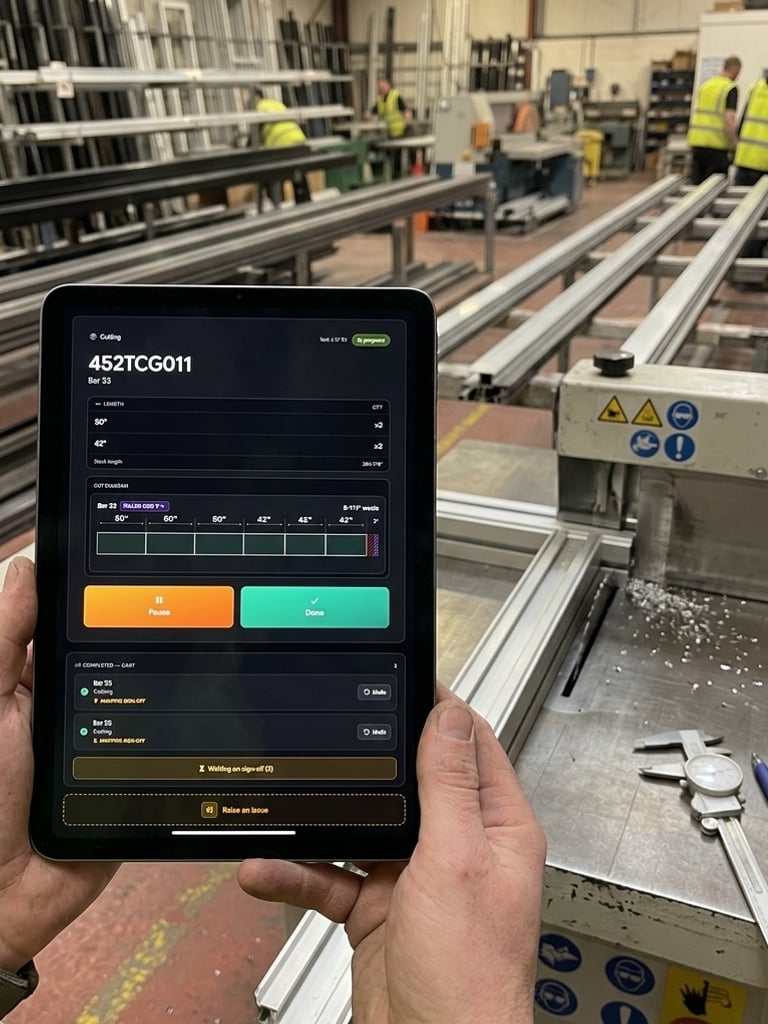
Spreadsheet cut editor with optimized nesting runs — pinned plans stamp yield onto the dashboard.
The floor pulse already reserves a slot for an hour-by-hour timeline; the next milestone fills it in with the workflows that live there.
Assemble pulls into ready-to-build kits with QR scan-out.
Line-side checklists and pacing for build steps.
Real-time pacing strip across the working day.
No self-serve trial for this layer. Tell us about your shop — volumes, current tools, the workflows you can't live without. We'll get back within one business day.